---
title: "OnStation Portal: Onboarding Guide"
description: A guided onboarding checklist in the OnStation Portal that helps organizations complete essential setup and configuration tasks.
---
[Skip to content](https://help.onstationapp.com/knowledge/onstation-portal-onboarding-guide#main-content)
English
Show submenu for translations
[More support](https://help.onstationapp.com/knowledge/kb-tickets/new?hsLang=en) [Support Portal](https://help.onstationapp.com/support-portal?hsLang=en)
[](https://www.onstationapp.com?hsLang=en)
- Support Tools
Show submenu for Support Tools
- [Updates & Bug Fixes](https://www.onstationapp.com/whats-new)
- [Webinars](https://www.youtube.com/@onstationapp/videos)
- [Training](https://help.onstationapp.com/knowledge/getting-started)
- [Submit A Ticket](https://share.hsforms.com/291l4uAzdR0C-hDSgSZKqUQ3053t)
- [Schedule Training](https://meetings.hubspot.com/aubrey-hadney/training-scheduler)
- [Visit Official Website](https://www.onstationapp.com/)
Open main navigation
Close main navigation
- Support Tools
Show submenu for Support Tools
- [Updates & Bug Fixes](https://www.onstationapp.com/whats-new)
- [Webinars](https://www.youtube.com/@onstationapp/videos)
- [Training](https://help.onstationapp.com/knowledge/getting-started)
- [Submit A Ticket](https://share.hsforms.com/291l4uAzdR0C-hDSgSZKqUQ3053t)
- [Schedule Training](https://meetings.hubspot.com/aubrey-hadney/training-scheduler)
- [Visit Official Website](https://www.onstationapp.com/)
- English
Show submenu for translations
- [More support](https://help.onstationapp.com/knowledge/kb-tickets/new)
- [Support Portal](https://help.onstationapp.com/support-portal)
- [Contact Us](https://www.onstationapp.com/contact-us)
[Contact Us](https://www.onstationapp.com/contact-us?hsLang=en)
How can we help you?
- There are no suggestions because the search field is empty.
1. [Knowledge Base](https://help.onstationapp.com/knowledge?hsLang=en)
2. [Getting Started](https://help.onstationapp.com/knowledge/getting-started?hsLang=en)
3. [Navigating the Portal](https://help.onstationapp.com/knowledge/getting-started?hsLang=en#navigating-the-portal)
April 8, 2026
# OnStation Portal: Onboarding Guide
## The Setup Guide is a built‑in checklist designed to help new and existing organizations complete the essential setup steps needed to take full advantage of OnStation. The guide walks administrators through key configuration tasks directly within the portal, making it easier to properly set up an organization and ensure teams are ready to work.
#### Who Sees the Onboarding Guide
- The Setup Guide is available to **new organizations** and **existing organizations** that have not yet completed all recommended setup steps.
- The guide automatically appears when applicable and remains visible until all required items are completed.
---
#### Where to Find the Onboarding Guide
The Onboarding Guide is accessible from the **top‑left menu** in the OnStation Portal.
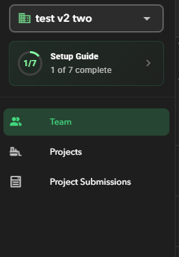
- A progress indicator (for example, **1 of 7 complete**) is shown next to the guide.
- The guide summary remains visible in the menu until onboarding is fully completed.
- Selecting the guide opens the full checklist.
---
#### Customized to Your Organization
The Onboarding Guide is **customized per organization** and only displays steps that apply to your setup.
- Certain steps appear **only when relevant**.
- Example:
- **Configure Integrations** is shown only if integrations are enabled for your organization.
- This ensures the guide stays focused and avoids unnecessary steps.
---
#### Onboarding Checklist Items

Depending on your organization’s configuration and permissions, the guide may include the following steps:
- **Configure Approval Settings**
Define how new users join your organization, including auto‑approval, email verification, or manual review.
- **Add Team Members**
Invite users so they can access projects and begin working in the field.
- **Assign Licenses**
Assign Locate, Capture, or Data licenses to team members.
- **Add Projects**
Create and assign projects so teams can access them in the app.
- **Create Groups**
Organize users into groups for permissions and data sharing.
- **Create Organization Tags**
Create tags that all users can apply when collecting data in the field.
- **Configure Integrations** *(if enabled)*
Set up integrations (such as HeavyJob) to sync data with external systems.
Each checklist item links directly to the relevant area of the portal to complete the task.
---
#### Permissions & Access
- All users can **view** the Onboarding Guide.
- Only users with the **required permissions** can:
- Access the linked setup pages
- Complete or check off checklist items
If you do not have permission for a specific step, it will still be visible, but you will not be able to complete it.
---
#### Progress & Completion
- Progress is tracked automatically as setup steps are completed.
- Once **all required checklist items are finished**, the Onboarding Guide and progress indicator are removed from the menu.
- The guide can still be opened later for reference.
---
#### Need Help?
If you have questions about onboarding, feature setup, or any checklist item, please reach out to [**OnStation Support**](https://www.onstationapp.com/contact-us?hsLang=en). Our team is happy to help guide you through the setup process.
- [Getting Started](https://help.onstationapp.com/knowledge/getting-started?hsLang=en#main-content)
- [New Sign-Up/Onboarding](https://help.onstationapp.com/knowledge/getting-started?hsLang=en#new-sign-up-onboarding)
- [Navigating the App](https://help.onstationapp.com/knowledge/getting-started?hsLang=en#navigating-the-app)
- [Navigating the Portal](https://help.onstationapp.com/knowledge/getting-started?hsLang=en#navigating-the-portal)
- [Project Submissions and Managment](https://help.onstationapp.com/knowledge/getting-started?hsLang=en#project-submissions-and-managment)
- [User Managment](https://help.onstationapp.com/knowledge/getting-started?hsLang=en#user-managment)
- [Troubleshooting](https://help.onstationapp.com/knowledge/getting-started?hsLang=en#troubleshooting)
- [Document the Work](https://help.onstationapp.com/knowledge/document-the-work?hsLang=en#main-content)
- [Flags](https://help.onstationapp.com/knowledge/document-the-work?hsLang=en#flags)
- [Photos](https://help.onstationapp.com/knowledge/document-the-work?hsLang=en#photos)
- [Forms](https://help.onstationapp.com/knowledge/document-the-work?hsLang=en#forms)
- [Measuring Tools](https://help.onstationapp.com/knowledge/document-the-work?hsLang=en#measuring-tools)
- [Troubleshooting](https://help.onstationapp.com/knowledge/document-the-work?hsLang=en#troubleshooting)
- [Finding Your Location](https://help.onstationapp.com/knowledge/finding-your-location?hsLang=en#main-content)
- [Learn More](https://help.onstationapp.com/knowledge/finding-your-location?hsLang=en#learn-more)
- [Troubleshooting](https://help.onstationapp.com/knowledge/finding-your-location?hsLang=en#troubleshooting)
- [Share & Collaborate](https://help.onstationapp.com/knowledge/share-collaborate?hsLang=en#main-content)
- [Learn More](https://help.onstationapp.com/knowledge/share-collaborate?hsLang=en#learn-more)
- [Troubleshooting](https://help.onstationapp.com/knowledge/share-collaborate?hsLang=en#troubleshooting)
- [Export & Report](https://help.onstationapp.com/knowledge/export-report?hsLang=en#main-content)
- [Learn More](https://help.onstationapp.com/knowledge/export-report?hsLang=en#learn-more)
- [Active Worksite™](https://help.onstationapp.com/knowledge/active-worksite?hsLang=en)
- [Integrations](https://help.onstationapp.com/knowledge/integrations?hsLang=en#main-content)
- [TransTech Systems](https://help.onstationapp.com/knowledge/integrations?hsLang=en#transtech-systems)
- [HeavyJob](https://help.onstationapp.com/knowledge/integrations?hsLang=en#heavyjob)
- [GNSS/GPS Receivers](https://help.onstationapp.com/knowledge/integrations?hsLang=en#gnss-gps-receivers)
- [FleetWatcher](https://help.onstationapp.com/knowledge/integrations?hsLang=en#fleetwatcher)
- [Trimble](https://help.onstationapp.com/knowledge/integrations?hsLang=en#trimble)
- [Bad Elf](https://help.onstationapp.com/knowledge/integrations?hsLang=en#bad-elf)
[](http://www.onstationapp.com?hsLang=en)
[mailto:email@email.com](mailto:email@email.com)
Copyright © 2026, OnStation