---
title: Using Forms in OnStation
description: "Streamline your data collection with digital forms. No more inaccurate, double, or null data. (Hint: works great with pre-loaded flags!)"
---
[Skip to content](https://help.onstationapp.com/knowledge/using-forms#main-content)
English
Show submenu for translations
[More support](https://help.onstationapp.com/knowledge/kb-tickets/new?hsLang=en) [Support Portal](https://help.onstationapp.com/support-portal?hsLang=en)
[](https://www.onstationapp.com?hsLang=en)
- Support Tools
Show submenu for Support Tools
- [Updates & Bug Fixes](https://www.onstationapp.com/whats-new)
- [Webinars](https://www.youtube.com/@onstationapp/videos)
- [Training](https://help.onstationapp.com/knowledge/getting-started)
- [Submit A Ticket](https://share.hsforms.com/291l4uAzdR0C-hDSgSZKqUQ3053t)
- [Schedule Training](https://meetings.hubspot.com/aubrey-hadney/training-scheduler)
- [Visit Official Website](https://www.onstationapp.com/)
Open main navigation
Close main navigation
- Support Tools
Show submenu for Support Tools
- [Updates & Bug Fixes](https://www.onstationapp.com/whats-new)
- [Webinars](https://www.youtube.com/@onstationapp/videos)
- [Training](https://help.onstationapp.com/knowledge/getting-started)
- [Submit A Ticket](https://share.hsforms.com/291l4uAzdR0C-hDSgSZKqUQ3053t)
- [Schedule Training](https://meetings.hubspot.com/aubrey-hadney/training-scheduler)
- [Visit Official Website](https://www.onstationapp.com/)
- English
Show submenu for translations
- [More support](https://help.onstationapp.com/knowledge/kb-tickets/new)
- [Support Portal](https://help.onstationapp.com/support-portal)
- [Contact Us](https://www.onstationapp.com/contact-us)
[Contact Us](https://www.onstationapp.com/contact-us?hsLang=en)
How can we help you?
- There are no suggestions because the search field is empty.
1. [Knowledge Base](https://help.onstationapp.com/knowledge?hsLang=en)
2. [Document the Work](https://help.onstationapp.com/knowledge/document-the-work?hsLang=en)
3. [Forms](https://help.onstationapp.com/knowledge/document-the-work?hsLang=en#forms)
October 15, 2026
# Using Forms in OnStation
## Streamline your data collection with digital forms. No more inaccurate, double, or null data. (Hint: works great with pre-loaded flags!)
---
#### Before You Begin
- Forms are **assigned by your organization** and are not created directly in the app.
- A form must be associated with a **specific flag icon** in the portal before it will appear in the app.
- Availability of forms depends on what your organization has enabled.
---
#### How to Complete a Form on a Flag
1. Open the **OnStation app**.
2. Select the project you want to work in.
> *Note: The app opens to the last project you were working in.*
3. Select the **flag icon to drop a flag **
4. Select the icon that the form is associated with (for example, a **white flag**).
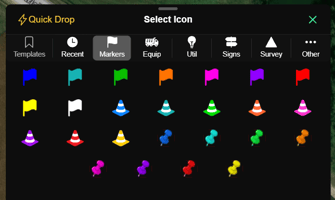
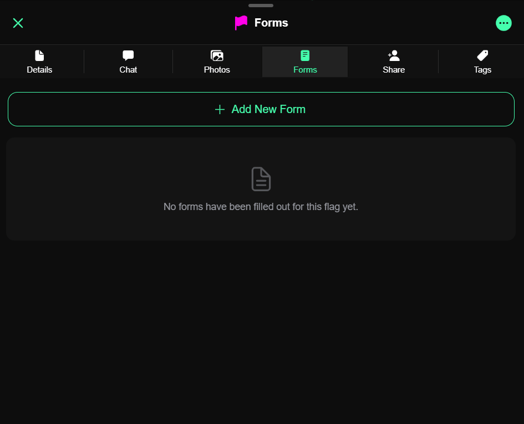
5. Add a title and drop the flag, or open an existing flag, and tap the **Forms**  tab.
6. Tap **+ Add New Form** and select the assigned form.
7. Complete the form fields as needed.
8. On the final page, tap **Complete** to submit the form.
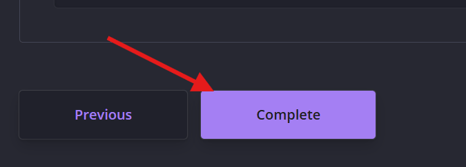
Once completed, the form is saved to the flag and can be reviewed later in the app or portal.
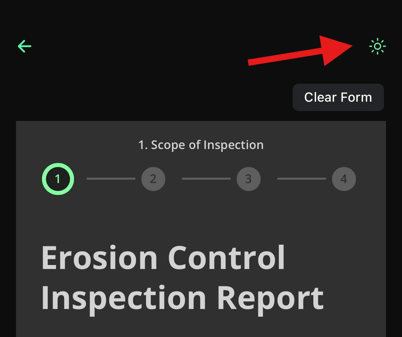
Working in bright sun? The forms screen has a light/dark mode toggle to make forms easier to read outdoors. This is available on any form built in our new form builder.
---
#### Important Notes
- The list of available forms is determined by your organization’s configuration.
- Company admins control which forms are enabled and which flag icons they are associated with.
- If you don’t see the expected form, confirm that the correct flag icon is being used.
If your team needs changes to an existing form or additional form capabilities, please contact [**OnStation Support**](https://www.onstationapp.com/contact-us?hsLang=en) so we can review what’s enabled for your organization and discuss next steps.
---
#### Related Articles
- [Forms Available in the Forms Library](https://help.onstationapp.com/knowledge/forms-available-in-forms-library?hsLang=en)
- [Flags: How to Use Quick Drop Mode](https://help.onstationapp.com/knowledge/quick-drop?hsLang=en)
- [OnStation Custom Forms](https://help.onstationapp.com/knowledge/onstation-custom-forms-dynamic-field-reporting-flag-integration?hsLang=en)
- [OnStation Form Sharing: How to Email Forms](https://help.onstationapp.com/knowledge/export-forms-via-email?hsLang=en)
- [Getting Started](https://help.onstationapp.com/knowledge/getting-started?hsLang=en#main-content)
- [New Sign-Up/Onboarding](https://help.onstationapp.com/knowledge/getting-started?hsLang=en#new-sign-up-onboarding)
- [Navigating the App](https://help.onstationapp.com/knowledge/getting-started?hsLang=en#navigating-the-app)
- [Navigating the Portal](https://help.onstationapp.com/knowledge/getting-started?hsLang=en#navigating-the-portal)
- [Project Submissions and Managment](https://help.onstationapp.com/knowledge/getting-started?hsLang=en#project-submissions-and-managment)
- [User Managment](https://help.onstationapp.com/knowledge/getting-started?hsLang=en#user-managment)
- [Troubleshooting](https://help.onstationapp.com/knowledge/getting-started?hsLang=en#troubleshooting)
- [Document the Work](https://help.onstationapp.com/knowledge/document-the-work?hsLang=en#main-content)
- [Flags](https://help.onstationapp.com/knowledge/document-the-work?hsLang=en#flags)
- [Photos](https://help.onstationapp.com/knowledge/document-the-work?hsLang=en#photos)
- [Forms](https://help.onstationapp.com/knowledge/document-the-work?hsLang=en#forms)
- [Measuring Tools](https://help.onstationapp.com/knowledge/document-the-work?hsLang=en#measuring-tools)
- [Troubleshooting](https://help.onstationapp.com/knowledge/document-the-work?hsLang=en#troubleshooting)
- [Finding Your Location](https://help.onstationapp.com/knowledge/finding-your-location?hsLang=en#main-content)
- [Learn More](https://help.onstationapp.com/knowledge/finding-your-location?hsLang=en#learn-more)
- [Troubleshooting](https://help.onstationapp.com/knowledge/finding-your-location?hsLang=en#troubleshooting)
- [Share & Collaborate](https://help.onstationapp.com/knowledge/share-collaborate?hsLang=en#main-content)
- [Learn More](https://help.onstationapp.com/knowledge/share-collaborate?hsLang=en#learn-more)
- [Troubleshooting](https://help.onstationapp.com/knowledge/share-collaborate?hsLang=en#troubleshooting)
- [Export & Report](https://help.onstationapp.com/knowledge/export-report?hsLang=en#main-content)
- [Learn More](https://help.onstationapp.com/knowledge/export-report?hsLang=en#learn-more)
- [Active Worksite™](https://help.onstationapp.com/knowledge/active-worksite?hsLang=en)
- [Integrations](https://help.onstationapp.com/knowledge/integrations?hsLang=en#main-content)
- [TransTech Systems](https://help.onstationapp.com/knowledge/integrations?hsLang=en#transtech-systems)
- [HeavyJob](https://help.onstationapp.com/knowledge/integrations?hsLang=en#heavyjob)
- [GNSS/GPS Receivers](https://help.onstationapp.com/knowledge/integrations?hsLang=en#gnss-gps-receivers)
- [FleetWatcher](https://help.onstationapp.com/knowledge/integrations?hsLang=en#fleetwatcher)
- [Trimble](https://help.onstationapp.com/knowledge/integrations?hsLang=en#trimble)
- [Bad Elf](https://help.onstationapp.com/knowledge/integrations?hsLang=en#bad-elf)
[](http://www.onstationapp.com?hsLang=en)
[mailto:email@email.com](mailto:email@email.com)
Copyright © 2026, OnStation