---
title: Understanding App Settings
description: A tour of OnStation's app Settings menu — profile, organizations, GPS, notifications, GNSS receivers, add-ons, and account options, all in one place.
---
[Skip to content](https://help.onstationapp.com/knowledge/understanding-app-settings#main-content)
English
Show submenu for translations
[More support](https://help.onstationapp.com/knowledge/kb-tickets/new?hsLang=en) [Support Portal](https://help.onstationapp.com/support-portal?hsLang=en)
[](https://www.onstationapp.com?hsLang=en)
- Support Tools
Show submenu for Support Tools
- [Updates & Bug Fixes](https://www.onstationapp.com/whats-new)
- [Webinars](https://www.youtube.com/@onstationapp/videos)
- [Training](https://help.onstationapp.com/knowledge/getting-started)
- [Submit A Ticket](https://share.hsforms.com/291l4uAzdR0C-hDSgSZKqUQ3053t)
- [Schedule Training](https://meetings.hubspot.com/aubrey-hadney/training-scheduler)
- [Visit Official Website](https://www.onstationapp.com/)
Open main navigation
Close main navigation
- Support Tools
Show submenu for Support Tools
- [Updates & Bug Fixes](https://www.onstationapp.com/whats-new)
- [Webinars](https://www.youtube.com/@onstationapp/videos)
- [Training](https://help.onstationapp.com/knowledge/getting-started)
- [Submit A Ticket](https://share.hsforms.com/291l4uAzdR0C-hDSgSZKqUQ3053t)
- [Schedule Training](https://meetings.hubspot.com/aubrey-hadney/training-scheduler)
- [Visit Official Website](https://www.onstationapp.com/)
- English
Show submenu for translations
- [More support](https://help.onstationapp.com/knowledge/kb-tickets/new)
- [Support Portal](https://help.onstationapp.com/support-portal)
- [Contact Us](https://www.onstationapp.com/contact-us)
[Contact Us](https://www.onstationapp.com/contact-us?hsLang=en)
How can we help you?
- There are no suggestions because the search field is empty.
1. [Knowledge Base](https://help.onstationapp.com/knowledge?hsLang=en)
2. [Getting Started](https://help.onstationapp.com/knowledge/getting-started?hsLang=en)
3. [Navigating the App](https://help.onstationapp.com/knowledge/getting-started?hsLang=en#navigating-the-app)
July 17, 2026
# Understanding App Settings
## Tap the gear icon from the map screen to open Settings. Here's what's inside and where to go for more detail on each section.
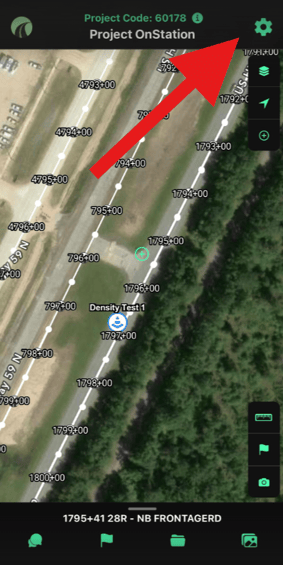
*Access the OnStation App settings menu via the gear icon at the top right of the screen.*
#### Profile & license
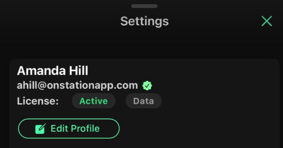
*Your name, email, and license tier at a glance. Tap Edit Profile to make changes.*
Your name, email, and current license tier show at the top of Settings. Tap **Edit Profile** to update your information.
---
#### Organizations
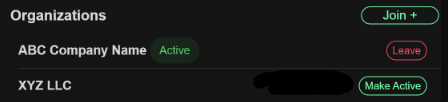
If you're linked to more than one organization, you can switch which one is active — see [Switching Between Organizations →](https://help.onstationapp.com/knowledge/switching-between-organizations?hsLang=en) for the full walkthrough. You can also add a new organization or leave one from this section.
---
#### Referral program
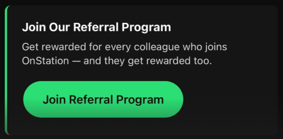
If you'd like to refer new users to OnStation, you can join the referral program from this section — refer a colleague and you get rewarded.
---
#### Active Worksite
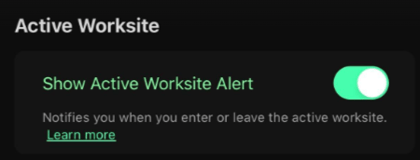
Active Worksite is a safety feature that lets you alert the traveling public when they're entering an active work zone. Toggle **Show Active Worksite Alert** here to notify your crew when they enter or leave the worksite.
[Learn more: How to turn on and use Active Worksite as a user →](https://help.onstationapp.com/knowledge/how-to-turn-on-and-use-active-worksite-as-a-user?hsLang=en)
#### Location
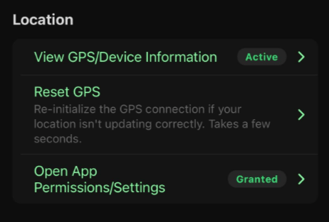
*Location settings — view your GPS status, reset the connection, or jump to your device's app permissions.*
- **View GPS/Device Information** — see your current GPS connection status. [Learn more: How to run and send a GPS diagnostic report →](https://help.onstationapp.com/knowledge/how-to-run-and-send-a-gps-diagnostic-report-in-onstation?hsLang=en)
- **Reset GPS** — tap to re-initialize your GPS connection if your location isn't updating correctly. You'll see a confirmation that says "GPS connection has been reset." Takes a few seconds.
- **Open App Permissions/Settings** — takes you out of OnStation and into your device's own Settings app, where you can review or change location and other app permissions.
---
#### Notifications
Notifications require two steps. Even after you allow notifications at the device level (iOS or Android), you also have to enable **Push Notifications** here, inside OnStation's app settings. If either one is off, you won't receive chat, flag, or support notifications.
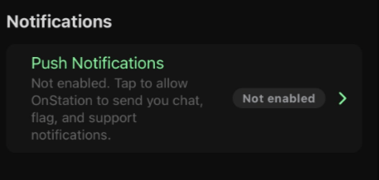
*If Push Notifications shows "Not enabled," tap it to turn notifications on inside the app — separate from your device's notification permission.*
---
#### GNSS receivers
If you're connecting an external GNSS receiver — Trimble, Bad Elf, or another supported device — see [Integrations](https://help.onstationapp.com/knowledge/integrations#main-content) for setup and troubleshooting by device.
---
#### Add-ons
Active Worksite, Custom Layers, GNSS integrations, HeavyJob, TransTech, FleetWatcher, Pay Line Items, and PDF Overlays all show their activation status here. [Learn more: Using Add-Ons in the OnStation Portal →](https://help.onstationapp.com/knowledge/using-add-ons-in-the-onstation-portal?hsLang=en)
---
#### Need help?
Quick links to Search the Knowledgebase, Contact OnStation Support, and View the OnStation Privacy Policy.
---
#### Join the community
Links to OnStation's Instagram, Facebook, LinkedIn, and YouTube.
---
#### Configure GPS receivers
Setup guides for supported external GNSS devices (Bad Elf, Leica, and others) — [Integrations](/knowledge/integrations#main-contenthttps://help.onstationapp.com/knowledge/integrations#main-content) for device-specific instructions.
---
#### Account
Log out of OnStation, or delete your account, from this section.
Need help? Call or text us at (216) 503-8554, or [reach out online](https://www.onstationapp.com/contact-us?hsLang=en).
- [Getting Started](https://help.onstationapp.com/knowledge/getting-started?hsLang=en#main-content)
- [New Sign-Up/Onboarding](https://help.onstationapp.com/knowledge/getting-started?hsLang=en#new-sign-up-onboarding)
- [Navigating the App](https://help.onstationapp.com/knowledge/getting-started?hsLang=en#navigating-the-app)
- [Navigating the Portal](https://help.onstationapp.com/knowledge/getting-started?hsLang=en#navigating-the-portal)
- [Project Submissions and Managment](https://help.onstationapp.com/knowledge/getting-started?hsLang=en#project-submissions-and-managment)
- [User Managment](https://help.onstationapp.com/knowledge/getting-started?hsLang=en#user-managment)
- [Troubleshooting](https://help.onstationapp.com/knowledge/getting-started?hsLang=en#troubleshooting)
- [Document the Work](https://help.onstationapp.com/knowledge/document-the-work?hsLang=en#main-content)
- [Flags](https://help.onstationapp.com/knowledge/document-the-work?hsLang=en#flags)
- [Photos](https://help.onstationapp.com/knowledge/document-the-work?hsLang=en#photos)
- [Forms](https://help.onstationapp.com/knowledge/document-the-work?hsLang=en#forms)
- [Measuring Tools](https://help.onstationapp.com/knowledge/document-the-work?hsLang=en#measuring-tools)
- [Troubleshooting](https://help.onstationapp.com/knowledge/document-the-work?hsLang=en#troubleshooting)
- [Finding Your Location](https://help.onstationapp.com/knowledge/finding-your-location?hsLang=en#main-content)
- [Learn More](https://help.onstationapp.com/knowledge/finding-your-location?hsLang=en#learn-more)
- [Troubleshooting](https://help.onstationapp.com/knowledge/finding-your-location?hsLang=en#troubleshooting)
- [Share & Collaborate](https://help.onstationapp.com/knowledge/share-collaborate?hsLang=en#main-content)
- [Learn More](https://help.onstationapp.com/knowledge/share-collaborate?hsLang=en#learn-more)
- [Troubleshooting](https://help.onstationapp.com/knowledge/share-collaborate?hsLang=en#troubleshooting)
- [Export & Report](https://help.onstationapp.com/knowledge/export-report?hsLang=en)
- [Active Worksite™](https://help.onstationapp.com/knowledge/active-worksite?hsLang=en)
- [Integrations](https://help.onstationapp.com/knowledge/integrations?hsLang=en#main-content)
- [TransTech Systems](https://help.onstationapp.com/knowledge/integrations?hsLang=en#transtech-systems)
- [HeavyJob](https://help.onstationapp.com/knowledge/integrations?hsLang=en#heavyjob)
- [GNSS/GPS Receivers](https://help.onstationapp.com/knowledge/integrations?hsLang=en#gnss-gps-receivers)
- [FleetWatcher](https://help.onstationapp.com/knowledge/integrations?hsLang=en#fleetwatcher)
- [Trimble](https://help.onstationapp.com/knowledge/integrations?hsLang=en#trimble)
- [Bad Elf](https://help.onstationapp.com/knowledge/integrations?hsLang=en#bad-elf)
[](http://www.onstationapp.com?hsLang=en)
[mailto:email@email.com](mailto:email@email.com)
Copyright © 2026, OnStation