---
title: "OnStation Bulk Flag Update: Faster Group Editing Tools"
description: Learn how to use OnStation’s new Bulk Flag Update feature to quickly edit multiple flags—hazards, icons, notes, tags, and more. Available with a Capture License.
---
[Skip to content](https://help.onstationapp.com/knowledge/onstation-bulk-flag-update-faster-group-editing-tools#main-content)
English
Show submenu for translations
[More support](https://help.onstationapp.com/knowledge/kb-tickets/new?hsLang=en) [Support Portal](https://help.onstationapp.com/support-portal?hsLang=en)
[](https://www.onstationapp.com?hsLang=en)
- Support Tools
Show submenu for Support Tools
- [Updates & Bug Fixes](https://www.onstationapp.com/whats-new)
- [Training Webinars](https://www.onstationapp.com/training-webinars)
- [General Stationing Training](https://www.onstationapp.com/stationing-training-series)
- [Submit A Ticket](https://share.hsforms.com/291l4uAzdR0C-hDSgSZKqUQ3053t)
- [Schedule Training](https://meetings.hubspot.com/aubrey-hadney/training-scheduler)
- [Visit Official Website](https://www.onstationapp.com/)
Open main navigation
Close main navigation
- Support Tools
Show submenu for Support Tools
- [Updates & Bug Fixes](https://www.onstationapp.com/whats-new)
- [Training Webinars](https://www.onstationapp.com/training-webinars)
- [General Stationing Training](https://www.onstationapp.com/stationing-training-series)
- [Submit A Ticket](https://share.hsforms.com/291l4uAzdR0C-hDSgSZKqUQ3053t)
- [Schedule Training](https://meetings.hubspot.com/aubrey-hadney/training-scheduler)
- [Visit Official Website](https://www.onstationapp.com/)
- English
Show submenu for translations
- [More support](https://help.onstationapp.com/knowledge/kb-tickets/new)
- [Support Portal](https://help.onstationapp.com/support-portal)
- [Contact Us](https://www.onstationapp.com/contact-us)
[Contact Us](https://www.onstationapp.com/contact-us?hsLang=en)
How can we help you?
- There are no suggestions because the search field is empty.
1. [Knowledge Base](https://help.onstationapp.com/knowledge?hsLang=en)
2. [Document the Work](https://help.onstationapp.com/knowledge/document-the-work?hsLang=en)
3. [Flags](https://help.onstationapp.com/knowledge/document-the-work?hsLang=en#flags)
April 1, 2026
# OnStation Bulk Flag Update: Faster Group Editing Tools
## Master Your Flags-Introducing OnStation’s New Bulk Flag Update Feature
OnStation just made managing large groups of flags *dramatically* easier. With the new **Bulk Flag Update** tool—available exclusively to users with a **Capture or Data License**—you can edit multiple flags at once, clean up your map faster, and keep your project data sharp and up‑to‑date with just a few taps.
If you work with lots of flags, this update is a game‑changer.
---
#### **Where to Find the Bulk Flag Update Tool**
You can access the new feature in **two quick ways**:
### **1. From the Flag menu**
- Open the **Flag menu** at the bottom of the screen.
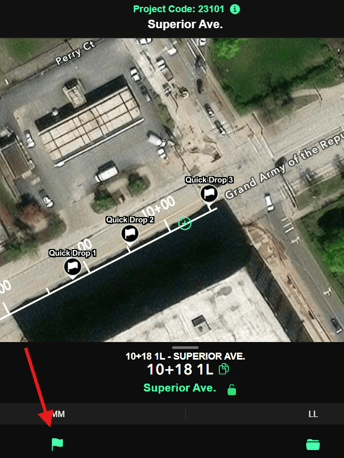
- Tap either the Select all or Select flags option. Then Tap Edit to edit the flags

- This method takes you directing the map details editor.
### **2. Tap & Hold Any Individual Flag**
- Press and hold a flag on the map.
- A **Bulk Update menu** will appear, allowing you to jump right into selecting flags.
---
#### **Three Ways to Select Flags via method 2**
Once bulk mode is active, you can choose flags using whatever method works best for your workflow via the selection menu bar:

### **▶ Select All **
Perfect for quick updates:
- Tap **Select All** to highlight every flag currently displayed on the map.
### **▶ Draw an Area**
Great for location-based editing:
- Use your finger to **draw a boundary** around the zone you want to include.
- All flags inside the shape will be added to the group.
### **▶ Tap Individual Flags**
For precise control:
- Tap any flag to add it to the selection.
And if you want to **unselect** one?
Just tap it again—the flag will turn **yellow**, clearly showing it’s been deselected.
---
#### **What You Can Edit in Bulk**
Once your group is selected, you can adjust multiple data points at the same time, including:
- **Hazard Status**
- **Flag Icon**
- **Notes** (quickly attach the same note to all selected flags)
- **Tags** (add or organize project tagging with one command)
- **Share Options** (send grouped details out in one batch)
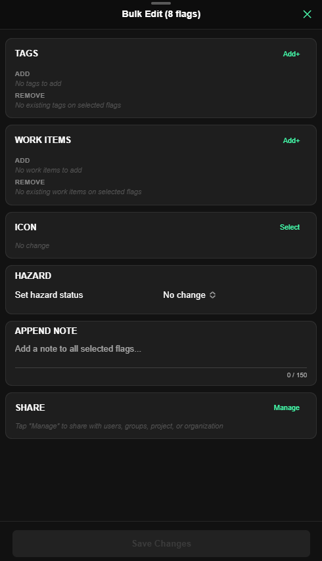
This makes project cleanup, safety reviews, tagging, and communication far faster and more consistent.
---
#### **Why This Matters**
Whether you’re organizing a crowded map, updating hazard zones after a site walk, or standardizing flags during a team handoff, the new Bulk Flag Update feature saves time, reduces taps, and ensures the entire crew sees accurate information across devices.
- [Getting Started](https://help.onstationapp.com/knowledge/getting-started?hsLang=en#main-content)
- [New Sign-Up/Onboarding](https://help.onstationapp.com/knowledge/getting-started?hsLang=en#new-sign-up-onboarding)
- [Navigating the App](https://help.onstationapp.com/knowledge/getting-started?hsLang=en#navigating-the-app)
- [Navigating the Portal](https://help.onstationapp.com/knowledge/getting-started?hsLang=en#navigating-the-portal)
- [Project Submissions and Managment](https://help.onstationapp.com/knowledge/getting-started?hsLang=en#project-submissions-and-managment)
- [User Managment](https://help.onstationapp.com/knowledge/getting-started?hsLang=en#user-managment)
- [Troubleshooting](https://help.onstationapp.com/knowledge/getting-started?hsLang=en#troubleshooting)
- [Document the Work](https://help.onstationapp.com/knowledge/document-the-work?hsLang=en#main-content)
- [Flags](https://help.onstationapp.com/knowledge/document-the-work?hsLang=en#flags)
- [Photos](https://help.onstationapp.com/knowledge/document-the-work?hsLang=en#photos)
- [Forms](https://help.onstationapp.com/knowledge/document-the-work?hsLang=en#forms)
- [Measuring Tools](https://help.onstationapp.com/knowledge/document-the-work?hsLang=en#measuring-tools)
- [Troubleshooting](https://help.onstationapp.com/knowledge/document-the-work?hsLang=en#troubleshooting)
- [Finding Your Location](https://help.onstationapp.com/knowledge/finding-your-location?hsLang=en#main-content)
- [Learn More](https://help.onstationapp.com/knowledge/finding-your-location?hsLang=en#learn-more)
- [Troubleshooting](https://help.onstationapp.com/knowledge/finding-your-location?hsLang=en#troubleshooting)
- [Share & Collaborate](https://help.onstationapp.com/knowledge/share-collaborate?hsLang=en#main-content)
- [Learn More](https://help.onstationapp.com/knowledge/share-collaborate?hsLang=en#learn-more)
- [Troubleshooting](https://help.onstationapp.com/knowledge/share-collaborate?hsLang=en#troubleshooting)
- [Export & Report](https://help.onstationapp.com/knowledge/export-report?hsLang=en#main-content)
- [Learn More](https://help.onstationapp.com/knowledge/export-report?hsLang=en#learn-more)
- [Active Worksite™](https://help.onstationapp.com/knowledge/active-worksite?hsLang=en)
- [Integrations](https://help.onstationapp.com/knowledge/integrations?hsLang=en#main-content)
- [TransTech Systems](https://help.onstationapp.com/knowledge/integrations?hsLang=en#transtech-systems)
- [HeavyJob](https://help.onstationapp.com/knowledge/integrations?hsLang=en#heavyjob)
- [GNSS/GPS Receivers](https://help.onstationapp.com/knowledge/integrations?hsLang=en#gnss-gps-receivers)
- [FleetWatcher](https://help.onstationapp.com/knowledge/integrations?hsLang=en#fleetwatcher)
- [Trimble](https://help.onstationapp.com/knowledge/integrations?hsLang=en#trimble)
- [Bad Elf](https://help.onstationapp.com/knowledge/integrations?hsLang=en#bad-elf)
[](http://www.onstationapp.com?hsLang=en)
[mailto:email@email.com](mailto:email@email.com)
Copyright © 2026, OnStation