---
title: How to login to the Management Portal
description: With a Management or Data Package comes the ability to log into our OnStation Portal. See the steps below to connect to the portal.
---
[Skip to content](https://help.onstationapp.com/knowledge/how-to-login-to-the-management-portal#main-content)
English
Show submenu for translations
[More support](https://help.onstationapp.com/knowledge/kb-tickets/new?hsLang=en) [Support Portal](https://help.onstationapp.com/support-portal?hsLang=en)
[](https://www.onstationapp.com?hsLang=en)
- Support Tools
Show submenu for Support Tools
- [Updates & Bug Fixes](https://www.onstationapp.com/whats-new)
- [Training Webinars](https://www.onstationapp.com/training-webinars)
- [General Stationing Training](https://www.onstationapp.com/stationing-training-series)
- [Submit A Ticket](https://share.hsforms.com/291l4uAzdR0C-hDSgSZKqUQ3053t)
- [Schedule Training](https://meetings.hubspot.com/aubrey-hadney/training-scheduler)
- [Visit Official Website](https://www.onstationapp.com/)
Open main navigation
Close main navigation
- Support Tools
Show submenu for Support Tools
- [Updates & Bug Fixes](https://www.onstationapp.com/whats-new)
- [Training Webinars](https://www.onstationapp.com/training-webinars)
- [General Stationing Training](https://www.onstationapp.com/stationing-training-series)
- [Submit A Ticket](https://share.hsforms.com/291l4uAzdR0C-hDSgSZKqUQ3053t)
- [Schedule Training](https://meetings.hubspot.com/aubrey-hadney/training-scheduler)
- [Visit Official Website](https://www.onstationapp.com/)
- English
Show submenu for translations
- [More support](https://help.onstationapp.com/knowledge/kb-tickets/new)
- [Support Portal](https://help.onstationapp.com/support-portal)
- [Contact Us](https://www.onstationapp.com/contact-us)
[Contact Us](https://www.onstationapp.com/contact-us?hsLang=en)
How can we help you?
- There are no suggestions because the search field is empty.
1. [Knowledge Base](https://help.onstationapp.com/knowledge?hsLang=en)
2. [Getting Started](https://help.onstationapp.com/knowledge/getting-started?hsLang=en)
3. [Navigating the Portal](https://help.onstationapp.com/knowledge/getting-started?hsLang=en#navigating-the-portal)
June 5, 2025
# How to login to the Management Portal
## With a Management or Data Package comes the ability to log into our OnStation Portal. See the steps below to connect to the portal.
Note: To be able to access the Portal you must be designated as an OnStation Manager for your Organization. Once a customer user has been made a Manager for their Company, they create/update user accounts to make other users Managers. [OnStation Support](https://share.hsforms.com/13V-qBlKZQzWJyakZGuW8Ug3053t?__hstc=75837514.8db384141278d70a2cc2301b7d4caf00.1706034662052.1715179819291.1715182992833.227&__hssc=75837514.6.1715182992833&__hsfp=2160068541)can also assist with setting up users with this elevated permission.
1. You can reach the user portal via our main website [www.onstationapp.com](https://www.onstationapp.com/?hsLang=en)
2. Click the **Login** button at the top right corner of the webpage, and that will redirect you to the portal login
1. 1. 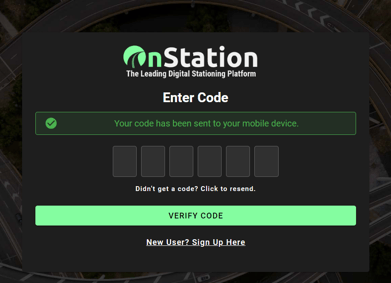
3. Input your mobile number or email address and click **"SEND LOGIN CODE"**. A 6 digit code will then be texted or emailed to you depending on which login method you chose.
1. 1. 
4. Enter the code you received
1. 1. 
5. Upon entering the 6 digit code you received, you will be signed into the portal automatically. You should now be seeing the portal dashboard
1. 1. 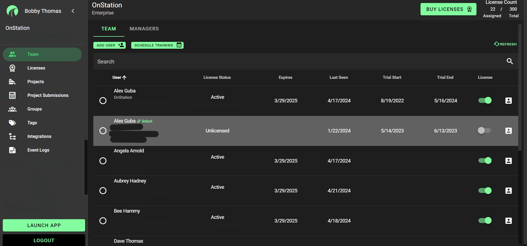
Congratulations on successfully logging into the OnStation Management portal! Take a look around and make yourself familiar with all the tools at your disposal. We have a series of articles here that are designed to make your experience with OnStation integration seamless.
And of course if you have any issues, questions, or suggestions to improve, our support line is just as easily accessible as the portal. Do not hesitate to reach our with any questions or suggestions you may have.
We can be reached via phone or the customer support form found on our "[Contact Us](https://share.hsforms.com/13V-qBlKZQzWJyakZGuW8Ug3053t?__hstc=75837514.8db384141278d70a2cc2301b7d4caf00.1706034662052.1715179819291.1715182992833.227&__hssc=75837514.6.1715182992833&__hsfp=2160068541)" page
Call - [**(216) 503-8554**](tel:2165038554)
Text - [**(216) 503-8554**](tel:2165038554)
Contact us web page - [Ways To Contact Us](https://www.onstationapp.com/contact-us?hsLang=en)
- [Getting Started](https://help.onstationapp.com/knowledge/getting-started?hsLang=en#main-content)
- [New Sign-Up/Onboarding](https://help.onstationapp.com/knowledge/getting-started?hsLang=en#new-sign-up-onboarding)
- [Navigating the App](https://help.onstationapp.com/knowledge/getting-started?hsLang=en#navigating-the-app)
- [Navigating the Portal](https://help.onstationapp.com/knowledge/getting-started?hsLang=en#navigating-the-portal)
- [Project Submissions and Managment](https://help.onstationapp.com/knowledge/getting-started?hsLang=en#project-submissions-and-managment)
- [User Managment](https://help.onstationapp.com/knowledge/getting-started?hsLang=en#user-managment)
- [Troubleshooting](https://help.onstationapp.com/knowledge/getting-started?hsLang=en#troubleshooting)
- [Document the Work](https://help.onstationapp.com/knowledge/document-the-work?hsLang=en#main-content)
- [Flags](https://help.onstationapp.com/knowledge/document-the-work?hsLang=en#flags)
- [Photos](https://help.onstationapp.com/knowledge/document-the-work?hsLang=en#photos)
- [Forms](https://help.onstationapp.com/knowledge/document-the-work?hsLang=en#forms)
- [Measuring Tools](https://help.onstationapp.com/knowledge/document-the-work?hsLang=en#measuring-tools)
- [Troubleshooting](https://help.onstationapp.com/knowledge/document-the-work?hsLang=en#troubleshooting)
- [Finding Your Location](https://help.onstationapp.com/knowledge/finding-your-location?hsLang=en#main-content)
- [Learn More](https://help.onstationapp.com/knowledge/finding-your-location?hsLang=en#learn-more)
- [Troubleshooting](https://help.onstationapp.com/knowledge/finding-your-location?hsLang=en#troubleshooting)
- [Share & Collaborate](https://help.onstationapp.com/knowledge/share-collaborate?hsLang=en#main-content)
- [Learn More](https://help.onstationapp.com/knowledge/share-collaborate?hsLang=en#learn-more)
- [Troubleshooting](https://help.onstationapp.com/knowledge/share-collaborate?hsLang=en#troubleshooting)
- [Export & Report](https://help.onstationapp.com/knowledge/export-report?hsLang=en#main-content)
- [Learn More](https://help.onstationapp.com/knowledge/export-report?hsLang=en#learn-more)
- [Active Worksite™](https://help.onstationapp.com/knowledge/active-worksite?hsLang=en)
- [Integrations](https://help.onstationapp.com/knowledge/integrations?hsLang=en#main-content)
- [TransTech Systems](https://help.onstationapp.com/knowledge/integrations?hsLang=en#transtech-systems)
- [HeavyJob](https://help.onstationapp.com/knowledge/integrations?hsLang=en#heavyjob)
- [GNSS/GPS Receivers](https://help.onstationapp.com/knowledge/integrations?hsLang=en#gnss-gps-receivers)
- [FleetWatcher](https://help.onstationapp.com/knowledge/integrations?hsLang=en#fleetwatcher)
- [Trimble](https://help.onstationapp.com/knowledge/integrations?hsLang=en#trimble)
- [Bad Elf](https://help.onstationapp.com/knowledge/integrations?hsLang=en#bad-elf)
[](http://www.onstationapp.com?hsLang=en)
[mailto:email@email.com](mailto:email@email.com)
Copyright © 2026, OnStation